
For: Confluence admins.
Use this guide to plan a budget for profile and List posts. Your team pays X for API use and Atlassian for the app. These are separate charges.
Quick estimate: Basic Post reads cost about $37.50 per month in this example. This assumes ten timelines, with 25 posts fetched from each one daily for 30 days. It uses the default 24-hour app cache. The rate was checked on . Other API reads can raise the bill.
Which features use X API credits?
The app uses your key to fetch profile or List posts. It can also use the API to look up a username for a Message button.
Embedded Post, Video and Broadcast do not use your company key. Share, Follow, Mention and Hashtag buttons do not use it either. Without a key, a timeline may try X's public embed. That embed may show no posts.
Example monthly costs
|
Example site |
Active timelines |
Posts fetched each time |
App cache |
Estimated monthly Post cost |
|---|---|---|---|---|
|
Small |
2 |
10 |
24 hours |
$3.00 |
|
Growing |
10 |
25 |
24 hours |
$37.50 |
|
Larger |
20 |
50 |
24 hours |
$150.00 |
How the estimate works: Active timelines × Posts returned × 30 daily refreshes × $0.005 per Post. X listed that rate on .
In this example, each timeline gets a view each day. It returns all the posts requested. No posts are shared between timelines. The table counts only basic Post reads. These examples do not tell you what your own bill will be.
An active timeline is one profile or List with one post-count setting. If pages use the same source and setting, they can share one saved result. Count it once. The app fetches groups of 10, 25, 50 or 100 posts. A request for 11 can fetch up to 25.
How caching and X billing affect cost
|
What happens |
Effect on cost |
|---|---|
|
The app saves a timeline. Readers share the saved posts for 24 hours by default. You can set 1 to 168 hours. When that time ends, the next view starts a refresh. Timelines nobody views do not refresh. |
Fewer requests can mean fewer paid reads. A shorter time may show new posts sooner and make more requests. |
|
X avoids some repeat charges. X normally charges once for the same Post or User returned within a UTC day. That billing day resets at midnight UTC. |
Reading the same item again that day usually adds no charge for it. X calls this a soft guarantee. It may not always apply. |
This X billing rule affects the charge. It does not make the posts on your page newer.
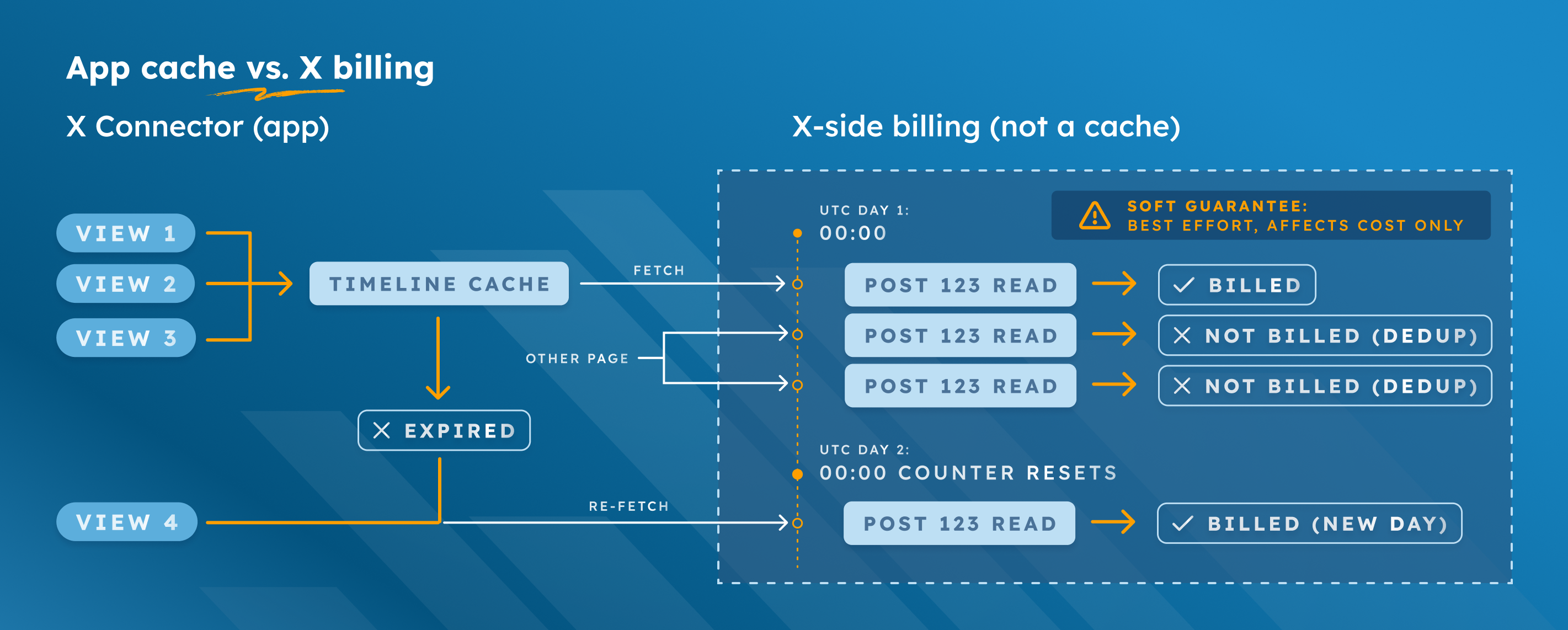
For the Growing site, the cache and the posts X returns affect cost:
|
App cache |
What X returns |
Basic Post cost over 30 days |
|---|---|---|
|
24 hours |
25 posts per timeline, once a day |
$37.50 |
|
168 hours |
25 posts per timeline, five refreshes in the month |
$6.25 |
|
1 hour |
The same 25 posts return all day; X avoids repeat charges that day |
$37.50 |
|
1 hour |
Five new posts enter each timeline every hour; X avoids repeat charges that day |
$210.00 |
|
1 hour |
25 posts return hourly; no repeat charges are removed |
$900.00 |
These examples do not put a cap on your bill. They assume all 10 timelines get a view when each cache period ends. Each returns the stated posts. The sums leave out User reads and other extra resources.
What else can change your bill?
-
X lists $0.010 per returned User. A List with posts from many people may cost more than a profile with the same post count. Looking up a profile's numeric ID can also add a User read.
-
A pinned, quoted or related Post may add reads. X may also return fewer posts than you ask for.
-
If timelines return some of the same Posts or Users, X may avoid repeat charges that day. A timeline normally makes no new request if nobody views it when its cache period ends.
-
X can change prices and limits. Check current usage and charges in your X Developer Console. The app's Credit balance shows available credits when X reports them. It does not show how much you spent this month.
Set and check a budget
-
Count the profile and List timelines people will view. If one source has different post-count settings, count each setting. Start with the default 24-hour cache.
-
Check prices and credits in the X Developer Console. Set a spending limit. If you reach it, X may block new API requests until the next billing cycle.
-
Test your timelines for a short time. Compare X credit use before and after. Check again when you change the cache or add timelines. Other apps using the same X account can also add to its spend.
Price basis: X API pricing and daily repeat-charge rules, checked . Check current rates in your Developer Console before you set a budget.